 FleetAI365
PDF to an operational load record
Rate confirmation software that keeps the source in view
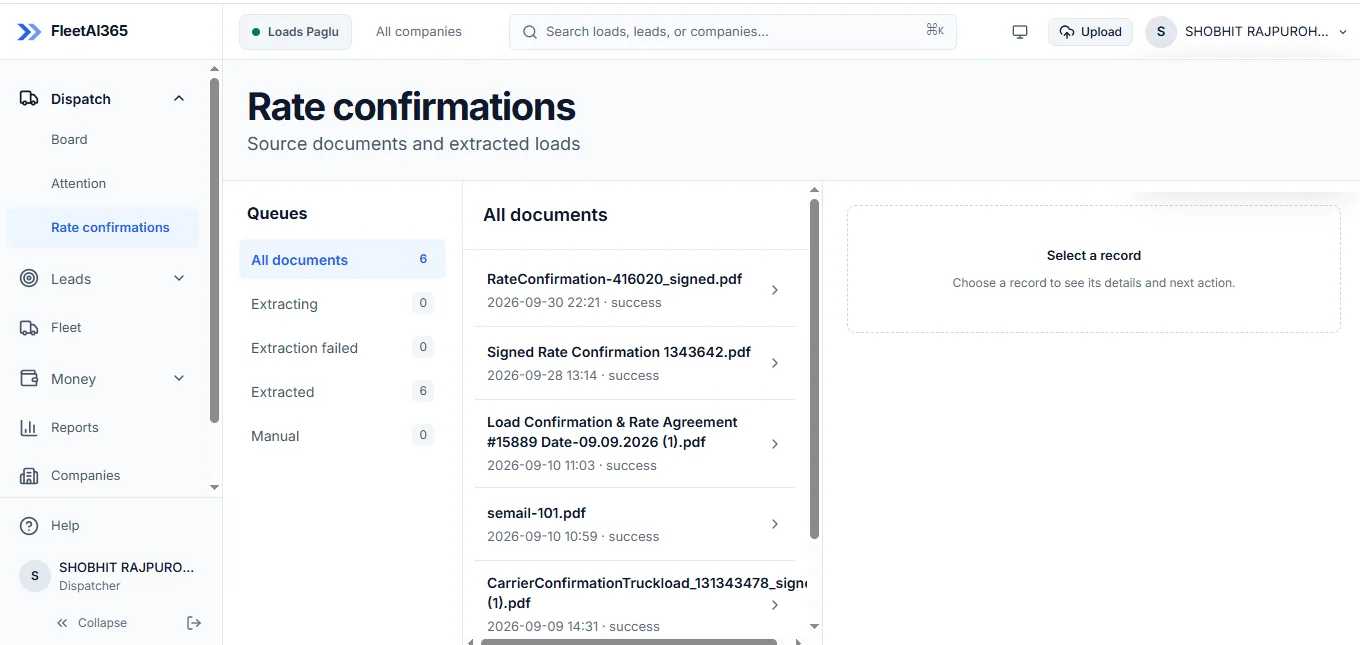
FleetAI365 extracts data from rate confirmation PDFs to eliminate manual entry. It automatically reads the broker, stops, appointment times, and rate into a load record while keeping the original document accessible.
Capture the key details from a tendered rate confirmation PDF, check them against the original and continue through a human-reviewed dispatch workflow.
From rate confirmation PDF to a load record
Rate confirmation software reads information from a broker’s confirmation and puts the details into a dispatch record, reducing repetitive re-entry while giving the dispatcher a place to verify the source. FleetAI365 accepts a rate confirmation PDF and extracts details such as broker, stops, appointment times and rate. The source document remains listed alongside the load information for reference.
Extraction is an assistance step, not a guarantee that every field in every PDF is correct. Review the load record against the original confirmation—especially dates, locations, amounts and any special instructions—before relying on the information for dispatch.
What happens after the PDF is added?
- Extract key information: AI reads supported load details from the rate confirmation into a load record.
- Compare with the source: keep the originating document available so a dispatcher can check the extracted facts.
- Run fixed checks: rules flag defined issues such as missing fields, impossible appointment times, overweight limits or duplicate bookings.
- Continue the dispatch workflow: after review, track the tendered load through Rate Cons, Booked, Dispatched, In Transit and Delivered.
Why keep the original PDF accessible?
A structured record makes details easier to search and use downstream, but the broker’s signed confirmation remains the source of truth for what was tendered. Keeping the source close to the extracted record helps a dispatcher identify a missed value, resolve a discrepancy and check that the carrier’s planned dispatch reflects the accepted terms.
AI may also draft a broker email using load facts. The draft is not sent automatically: a person reviews and clicks send. FleetAI365 does not autonomously accept loads, negotiate rates or find freight. It supports the operational work on a load already tendered to a carrier.
Rate confirmation software questions
Which fields can FleetAI365 extract?
The documented examples include broker, stops, appointment times, rate and load details. Review the original document for completeness and correctness before taking action.
Does FleetAI365 store the original source document?
FleetAI365 keeps source documents listed alongside loads extracted from them so dispatchers can refer back to the original. Consult product documentation or the team for current retention details.
What if an appointment time or rate is wrong in the record?
Compare it with the PDF and resolve the discrepancy before confirming dispatch actions. Fixed rules can flag defined issues, but source-document review is still important.
Is a rate confirmation parser a load board?
No. Reading a tendered rate confirmation does not find or match freight. FleetAI365 is dispatch management software, not a load board or broker.
See a rate confirmation become a reviewed load record.
Walk through extraction, source review and the dispatch board.
Book a Demo